Résumer cet article avec :
Automate regulatory questionnaires
In a world where regulatory compliance is increasingly complex, automating regulatory questionnaires becomes a necessity for businesses. This process not only saves time but also improves the accuracy of collected data. In this article, we will delve into the benefits of questionnaire automation, available tools, best practices to follow, and a FAQ section to answer all your questions.
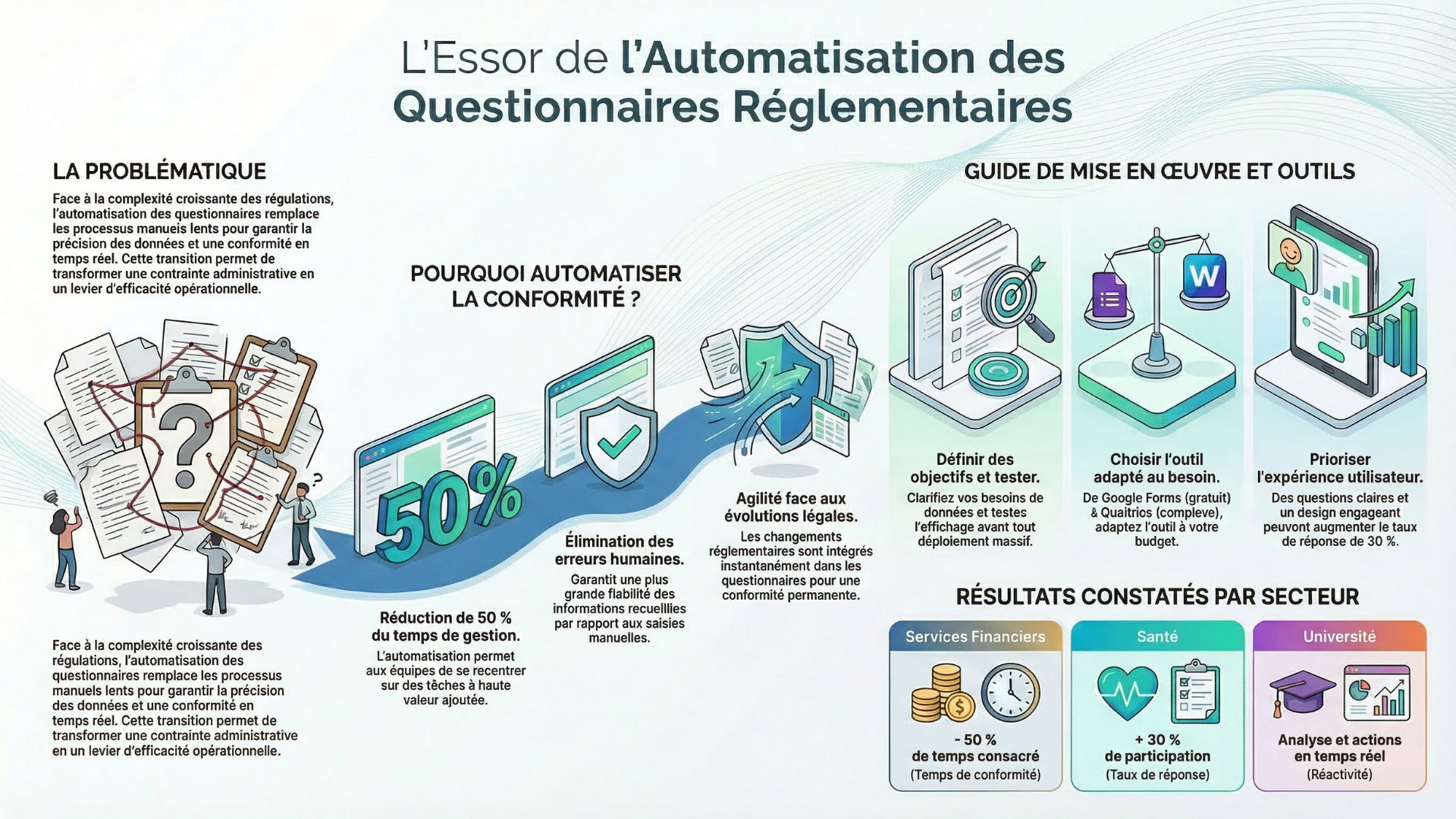
Automating regulatory questionnaires: what's the impact on you?
Why automate regulatory questionnaires?
Automating regulatory questionnaires offers numerous benefits. Firstly, it reduces the time spent on data collection and analysis. By automating these processes, businesses can focus on higher-value tasks. Furthermore, automation helps minimize human errors, thereby ensuring greater reliability of the information gathered.
Another crucial aspect is compliance. Regulations are constantly evolving, and it's essential for businesses to stay up-to-date. Automation allows for easy integration of regulatory changes into questionnaires, thus ensuring that collected data always complies with current requirements.
Questionnaire automation tools
Several tools are available on the market that facilitate the automation of regulatory questionnaires. These tools vary in terms of features, cost, and ease of use. Here are some of the most popular ones:
1. Google Forms
Google Forms is a free tool that allows you to easily create online questionnaires. It offers basic automation features, such as real-time response collection and data analysis via Google Sheets.
2. SurveyMonkey
SurveyMonkey is a more advanced tool that offers in-depth customization and analysis options. It is particularly useful for businesses that need to create complex questionnaires and gather detailed data.
3. Typeform
Typeform stands out with its user-friendly interface and attractive designs. This tool is ideal for questionnaires that require an engaging user experience, which can improve response rates.
4. Qualtrics
Qualtrics is a customer experience platform that offers advanced features for questionnaire automation. It allows for the management of complex surveys and in-depth analysis of results, making it a preferred choice for large enterprises.

Best practices for questionnaire automation
To get the most out of questionnaire automation, it's essential to follow certain best practices. Here are some practical tips:
1. Clearly define objectives
Before automating a questionnaire, it's crucial to clearly define the objectives of data collection. What do you want to learn? What decisions will you make based on the results? Once these questions are clarified, you can design a more effective questionnaire.
2. Choose the right tool
The choice of automation tool is crucial. Evaluate your specific needs, budget, and the complexity of the questionnaires you need to create. Don't hesitate to test several tools to find the one that best suits you.
3. Design clear and concise questions
Questions should be formulated clearly and concisely to avoid any confusion. Use simple language and avoid technical jargon that might confuse respondents.
4. Test the questionnaire before deployment
Before launching the questionnaire, conduct tests to ensure everything works correctly. Verify that questions display properly and that responses are recorded as expected.
5. Analyze results in depth
Once data is collected, it's essential to analyze it thoroughly. Use analytical tools to identify trends and insights that can guide your decisions. Remember that automation doesn't stop at data collection; it must also include effective analysis.
Real-world examples of questionnaire automation
To illustrate the importance of questionnaire automation, let's look at some real-world examples of companies that have successfully optimized their processes using this approach.
Example 1: A healthcare company
A healthcare company decided to automate its patient satisfaction questionnaires. Instead of distributing paper forms, it used an online tool to create a questionnaire. Patients could easily respond from their phone or computer. Thanks to this automation, the company increased its response rate by 30% and was able to gather valuable data on the patient experience.
Example 2: A financial services company
A financial services company automated its regulatory compliance questionnaires. By integrating the latest regulations into its automation tool, it ensured that all employees completed the required questionnaires without errors. This allowed the company to reduce the time spent on compliance by 50%.
Example 3: A university
A university used automation for its student satisfaction surveys. By sending automated questionnaires at the end of each semester, it was able to gather real-time feedback. The results were analyzed quickly, allowing the administration to take immediate action to improve the student experience.
FAQ on questionnaire automation
1. What is questionnaire automation?
Questionnaire automation involves using digital tools to create, distribute, and analyze questionnaires without manual intervention. This saves time and improves data accuracy.
2. What are the benefits of questionnaire automation?
The main benefits include reduced data collection time, improved accuracy, regulatory compliance, and the ability to quickly analyze results.
3. What tools can I use to automate my questionnaires?
There are several tools, such as Google Forms, SurveyMonkey, Typeform, and Qualtrics, each with its own features and benefits.
4. How to design an effective questionnaire?
To design an effective questionnaire, clearly define your objectives, ask clear and concise questions, and test the questionnaire before deploying it.
5. How to analyze the results of an automated questionnaire?
Use analysis tools to examine the collected data. Look for trends, patterns, and insights that can influence your decisions.
6. Is questionnaire automation expensive?
The cost depends on the tool you choose. Some tools are free, while others may require a subscription. Evaluate your needs to choose the best option.
7. Can I customize my automated questionnaires?
Yes, most automation tools allow you to customize questionnaires according to your specific needs, including design and question types.
8. What types of questionnaires can be automated?
Virtually all types of questionnaires can be automated, including satisfaction surveys, compliance questionnaires, and market research.
9. Can questionnaire automation improve response rates?
Yes, automation makes questionnaires more accessible, which can increase response rates. Automated reminders can also encourage respondents to participate.
10. How to ensure data security in automated questionnaires?
Choose tools that comply with data security standards, such as encryption and GDPR compliance. Also, inform respondents about how their data will be used.
Conclusion
In conclusion, automating regulatory questionnaires is an essential process for businesses looking to improve efficiency and compliance. By using the right tools and following best practices, you can transform how you collect and analyze data. Whether you are a small business or a large organization, automation can help you save time, reduce errors, and gain valuable insights. Don't wait any longer to integrate automation into your data collection processes and reap all its benefits.
Turn your quizzes into opportunities, right now
30 days free • No credit card required • No commitment